

QuickBooks Integration for Subscription Software
× 20 of 30 days left
= prorated charge
Bridge Gap Between QuickBooks Accounting and Subscription Operations
QuickBooks is built for accounting, not for the complexity of recurring revenue. SubscriptionFlow fills that gap, adding the subscription capabilities QuickBooks doesn’t offer on its own.
Tiered and Usage-Based Pricing
QuickBooks has no native support for tier-based or volume-based pricing. SubscriptionFlow manages tiered, volume-based, and usage-based plans natively by creating a separate SKU for each tier, then syncs the resulting invoices into QuickBooks as clean, correctly categorised transactions.
Deferred-to-Earned Revenue Automation
When a customer pays, SubscriptionFlow categorizes that payment as deferred revenue in QuickBooks and automatically converts it to earned revenue as the subscription cycle progresses.
Automated Dunning and Failed Payment Retries
QuickBooks does not chase a declined card for you. SubscriptionFlow automates payment retries and runs workflows across your connected payment gateways, recovering revenue before it ever becomes a bad debt entry in your books.
Advanced Invoicing for Non-Standard Charges
For invoices that don’t fit a standard template (larger accounts, customer terms, one-off charges), SubscriptionFlow’s advanced invoice feature lets you generate exactly the invoice you need, which then flows into QuickBooks like any other transaction.
How the Integration Works
Set up the SubscriptionFlow QuickBooks integration in minutes.
Connect Your QuickBooks Online Account
Authorize SubscriptionFlow to connect with your existing QuickBooks Online account, or create a new one.
Set Up Your Subscription Plans
Build your product catalogue, pricing plans, discounts, and tax rules in SubscriptionFlow and connect the payment gateway you use.
Let SubscriptionFlow Handle Billing and Collection
SubscriptionFlow runs your recurring billing cycles, sends invoices, processes payments, and manages failed-payment retries automatically.
Transactions Sync to QuickBooks Automatically
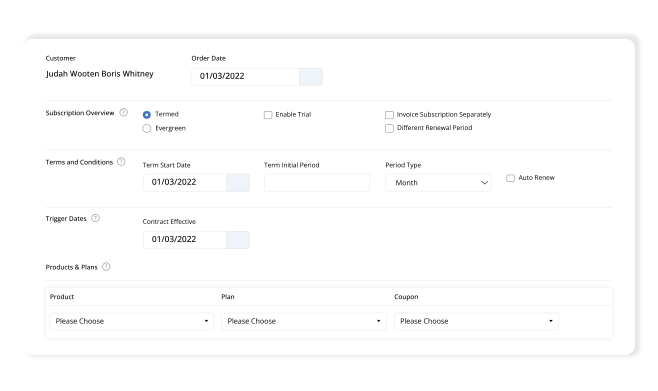
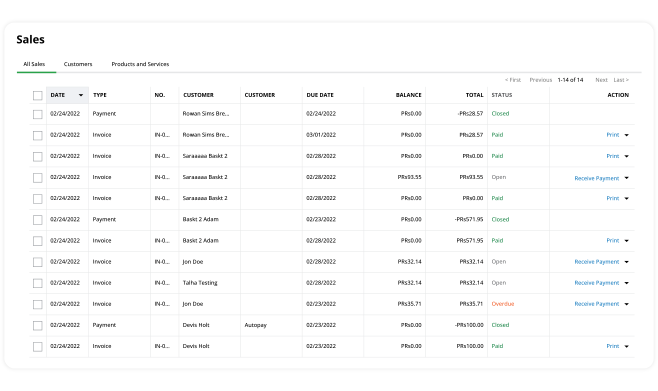
Every invoice, payment, refund, and deferred/earned revenue entry syncs with SubscriptionFlow into QuickBooks Online, with no time lag between a payment being collected and it appearing in your books.
Why SubscriptionFlow + QuickBooks Works Well
Not every subscription tool is built to work seamlessly with QuickBooks. Here’s what sets SubscriptionFlow apart.
Purpose-Built Sync From Billing to Books
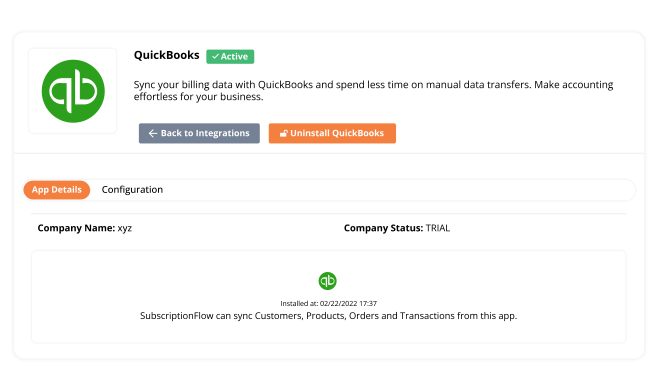
SubscriptionFlow automatically pushes your subscription data (invoices, transactions, payments, deferred/earned revenue) from SubscriptionFlow into QuickBooks Online.
Multiple Payment Gateways, One Sync
Whether customers pay through Stripe, GoCardless, PayPal, or QuickBooks Payments, all transactions flow into QuickBooks through the same automated process.
Pricing Flexibility QuickBooks Can’t Offer Alone
SubscriptionFlow manages the billing logic and hands QuickBooks clean, correctly categorized entries instead of a pile of workaround SKUs.
No Disruption to How Your Accountant Already Works
SubscriptionFlow enhances QuickBooks rather than replacing it. Your finance team operates within the familiar QuickBooks interface, receiving subscription and payment data seamlessly.
Eliminating Key Subscription Accounting Challenges
Businesses that manage subscription billing and QuickBooks accounting separately lose more than time; they lose accuracy, revenue, and visibility.
Manual spreadsheet reconciliation
High churn from payment failures
Disjointed customer records
Errors in revenue recognition
Advanced Features for Your QuickBooks Stack
Beyond billing and revenue sync, SubscriptionFlow adds capabilities that touch reporting, customer relationships, and how you accept payments – all connected back to QuickBooks.
Centralized Reporting That Bridges CRM and Finance
SubscriptionFlow’s reporting and analysis features pull together customer data and financial data into one place, instead of leaving you to cross-reference a CRM against QuickBooks manually. You get curated, analyzed reports on your finances alongside subscription performance, without maintaining a separate reporting layer.
Membership and Community-Based Subscription Support
If your business manages members (gyms, fitness centers, clubs, or paid communities) rather than just subscribers, SubscriptionFlow’s membership management features work alongside the QuickBooks integration to keep member data centralized and secure. You can track membership activity and accounting side by side.
Visibility Into Outstanding and Upcoming Payments
Once connected, QuickBooks Online shows you not just what’s been paid, but what hasn’t. It offers your team a clearer, more current view of receivables instead of discovering gaps during month-end reconciliation.
Flexible Account Connection, In-Person Payments Included
Whether you already run an existing QuickBooks Online account or need to set up a new one, SubscriptionFlow connects to either without disrupting your current setup. And if part of your business takes payments face-to-face, QuickBooks Payments and the GoPayment app and card reader let you accept in-store purchases that flow into the same connected system as your online recurring billing.
Synchronize Customers, Products, Orders and Transactions with QuickBooks!
The goal of Manage Subscription QuickBooks is to help businesses bridge the gap between customer management, finance and accounting operations such as:
- Recurring Billing
- Payment Processing
- Generating Online Quotes and Custom Invoices
- Forecasting Sales and Revenue Tracking
Manage Billing and Invoicing with QuickBooks Subscription Billing Software
With the help of QuickBooks Subscription Management Software, small businesses have gained more control over how their sales are performing. Synchronize your efforts with:
- Your Sales Pipeline
- Customer Management
- Inventory Management
- Production and Marketing and more!
Analyze Sales, Revenue and Expenses with Statistical Reports
Without any need for manual intervention, directly integrate and leverage daily synchronization for:
- Invoices
- Credit Notes
- Payments
- Refunds
- Taxes
- Revenue Recognition
Frequently Asked Questions
QuickBooks is an online accounting software made especially for small to medium businesses (SMBs). QuickBooks integration allows syncing of data with subscription software and automates accounting. It allows for easily manageable cash flow, payment reconciliation, and tax management.
SubscriptionFlow integrates only with QuickBooks online. No integration with desktop or other versions is available.
You can always schedule a demo to speak with one of our experts and see how the QuickBooks integration works before signing up with us.